Twelve questions to ask a Webflow developer before hiring, with a good answer and a worrying answer for each, from site ownership to payment stages.
Cover · a finished client build
11
min read
Before you hire a Webflow developer, ask who will own the Webflow site and the domain, how they name classes, what happens after launch, and how payments are staged. Those four answers tell you most of what a portfolio can't. Below are all 12 questions I'd ask, each with a good answer and an answer that should worry you. I'm a Webflow developer myself, so where I give my own answers, I say so.
The four questions that matter most
If you only have time for four, ask about account ownership, class naming, support after launch and the payment schedule. Ownership decides whether you can ever leave. Class naming decides whether another developer can take over. Support decides who fixes things in month three. The payment schedule shows how much risk the developer expects you to carry.
The other eight cover the CMS, time zones, revisions, SEO, accessibility, speed, the timeline and references. A summary table of all 12 is at the end, to copy into your notes for each call.
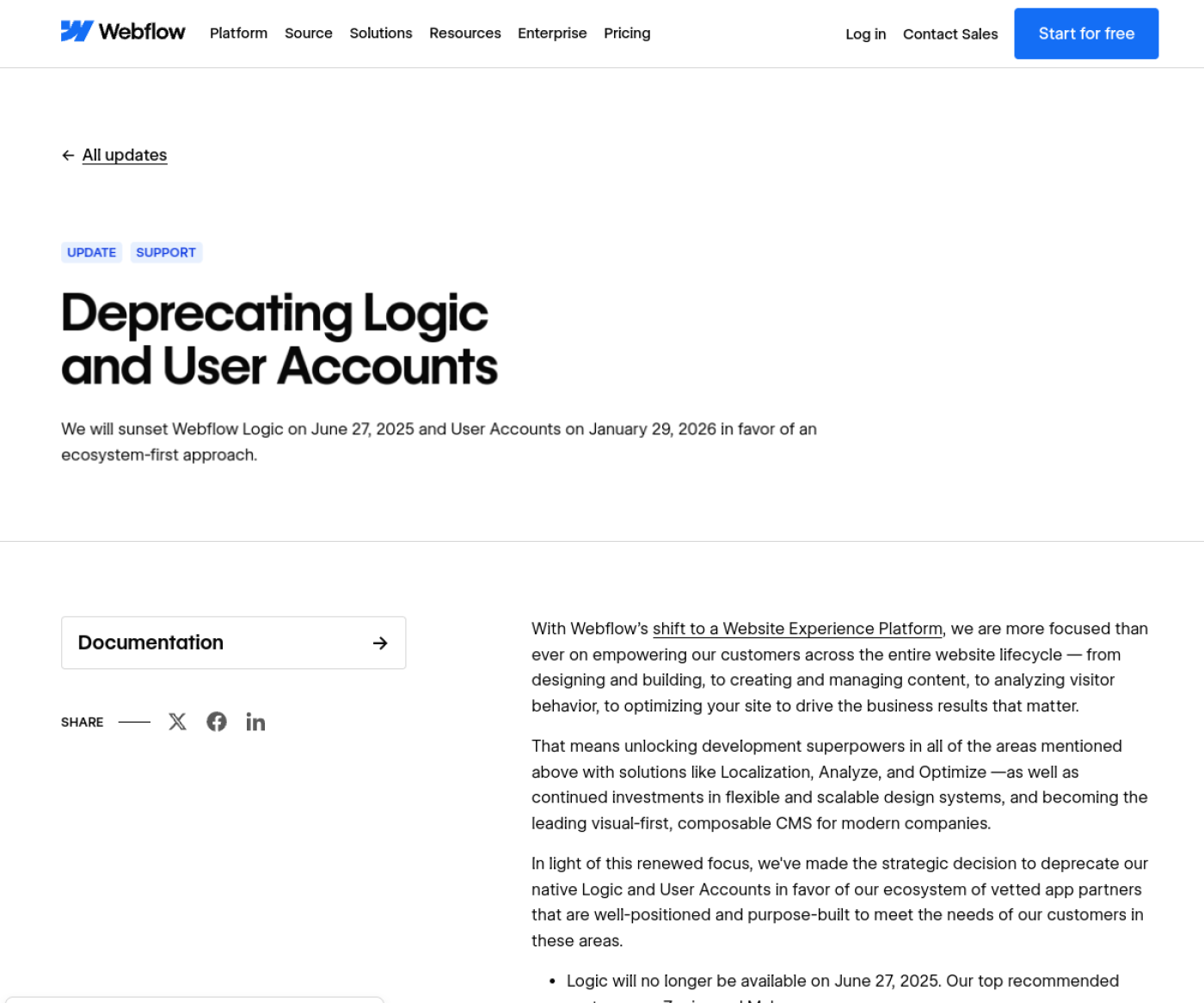
NoteA quick test of whether a proposal is current: if it offers Webflow Logic or Webflow's own User Accounts, it was written from an old template. Logic was retired on 27 June 2025 and User Accounts on 29 January 2026. Logins now need an app such as Memberstack.
Webflow's notice retiring Logic and User Accounts. Webflow Updates, captured 13 Oct 2026.
1. Who will own the Webflow site, the Workspace and the domain?
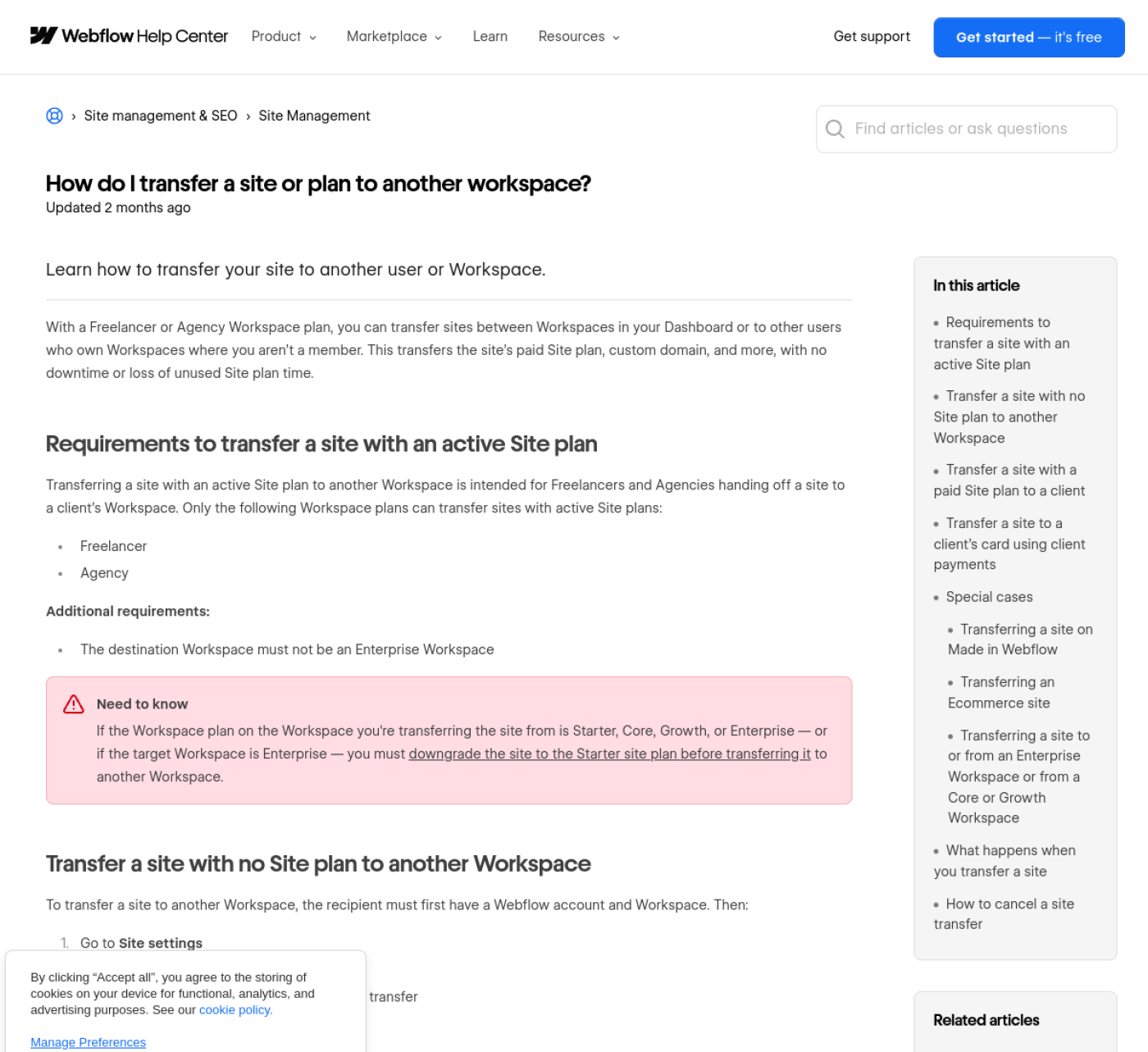
You should end up owning the site, paying its Site plan and holding the domain in your company's name. During the build, the site can sit in the developer's Workspace. At handover, Webflow lets the developer either bill the plan to you through client payments or transfer the whole site into your own Workspace.
Webflow's transfer article (updated 1 Aug 2026) says a transfer moves "the site's paid Site plan, custom domain, and more, with no downtime or loss of unused Site plan time." Client payments, per Webflow's help article (updated 2 Jul 2026), keeps the site in the developer's Workspace while you pay for it. That suits you if the same developer will maintain the site.
How a Webflow site moves to the client's Workspace. Webflow Help Center, captured 13 Oct 2026.
Ask what the site will cost each month after launch, separate from the developer's fee. As of October 2026, Webflow's pricing page lists Basic at $15 a month and Premium, which includes the CMS, at $25 a month, both billed yearly. Monthly billing is $25 and $39. For more on how plan fees sit next to the build price, see Webflow plan fees vs build cost.
Good answer: "The site moves to your Workspace at launch, or I bill the plan to you through client payments. You register the domain in your name and give me access to its DNS."
Worrying answer: "I'll keep it on my account and charge you a monthly hosting fee." That ties you to the developer and hides what Webflow charges.
2. Which class system do you use, and could another developer take over?
A good developer names classes with a published system, so a stranger can read the build. One of the most widely used in Webflow is Client-First, which Finsweet describes as its "CSS naming convention and Webflow style system." I build on Client-First. A class called section_pricing tells the next developer exactly what it styles.
The test is simple. Ask the developer to open a past project's Navigator and talk you through five class names. They should be readable without explanation.
Good answer: names a system (Client-First, or another documented one) and offers to show it in a real project.
Worrying answer: "I have my own way of doing it." Every class named div-block-47 or heading-copy-3 is something you'll pay the next developer to untangle.
3. How will you plan the CMS, and how will my team edit it?
The CMS should be planned on paper before anyone builds it: which collections, which fields, how they reference each other. Ask to see that plan. Ask too who on your team will edit content, and on which Webflow seat, because editing access is now set through seats and roles.
Webflow's seats and roles overview (updated 5 Oct 2026) gives the Content editor role permission to update text, replace images and manage Collection items, and nothing more. That's usually the right role for a marketing team that shouldn't change the layout. Premium caps a site at 20,000 CMS items and 40 collections, so a large blog or directory needs a plan for growth; see Webflow CMS limits.
Good answer: a collection-and-field list before the build, a handover where your editor publishes a test item, and written notes on what not to change.
Worrying answer: "We'll work out the CMS as we go." Restructuring collections after content is entered means re-entering content.
4. What happens after launch, and what does support cost?
Ask what's covered after launch, for how long, and what it costs when that ends. A clear answer has a fixed window for fixing the developer's own bugs, then a named monthly price for changes. Ask also what happens if the developer is ill or unavailable for a week, especially if you're hiring one person.
My own care plans are $150, $290 or $550 a month for 4, 8 or 15 hours. I'm one person, so the honest answer to "what if you're unavailable" is the build itself: a Client-First site can be picked up by another Webflow developer without a rebuild.
Good answer: a written bug-fix window, a monthly price with hours stated, and a reply time.
Worrying answer: "Just message me if anything comes up." It sounds generous until the developer is busy with a new client.
5. What hours do you overlap with mine?
Ask for the overlap in hours, and how the developer handles questions raised outside it. Distance isn't the problem; unanswered questions are. India Standard Time is UTC+5:30 all year, so New Delhi is 9.5 to 10.5 hours ahead of New York and 4.5 to 5.5 hours ahead of London.
For a US client, that means feedback sent at the end of your day reaches me before my day starts, and the changes are waiting for your next morning. For a UK client, my afternoon is your morning, which leaves room for live calls. I reply within one business day.
Good answer: names the overlap, the reply time and when calls are possible in your time zone.
Worrying answer: "I'm always available." Nobody is, and the promise usually breaks during the week you need it.
6. How are payments staged?
Payments should follow the work, so neither side carries all the risk. Ask how much is due up front, what triggers each later payment and which currency the invoice uses. A deposit is normal. Paying the full fee before you've seen any work is not.
My schedule: never more than 50% up front. Projects under $2,000 are paid 50/50. From $2,000 to $6,500, 40/30/30. Above $6,500, 30/30/20/20. Quotes and invoices are in USD.
Good answer: stages tied to milestones you can see, like an approved design or a staging link.
Worrying answer: 100% up front, or payment stages tied only to dates.
7. How many rounds of changes are included, and what counts as one?
A round of changes is one consolidated list of feedback, applied together. Ask how many rounds the price includes, at which stage, and what a change outside them costs. The definition matters more than the number: three rounds of "one tweak each" isn't the same as three full lists.
I include two rounds of changes. I ask for each round as one list, because scattered messages lead to missed items.
Good answer: a number, a definition, and a price for extra work.
Worrying answer: "Unlimited revisions" on a fixed-price build. Either the price is padded, or the unlimited part ends with an argument.
8. How will you handle SEO and redirects at launch?
If you're replacing an existing site, ask how every old URL will reach its new page. The answer should be 301 redirects, set in Webflow under Site settings, then Publishing, then 301 redirects, per Webflow's redirects article (updated 19 May 2026). Ask also who checks Google Search Console before and after launch.
My answer: every old URL gets a 301, and I check Search Console before and after launch. After a migration, I watch the site for 30 days. Webflow sets no hard cap on redirects but suggests keeping to about 1,000, using wildcard rules where URL patterns repeat.
Good answer: a list of old URLs mapped to new ones before launch, titles and meta descriptions per page, and a Search Console check afterwards.
Worrying answer: "Webflow handles SEO automatically." Webflow gives you the fields; someone still has to fill them and map the old URLs.
9. How do you build for accessibility?
Ask which standard the developer builds to and how they test it. The current reference is WCAG 2.2, a W3C Recommendation since 12 December 2024. A good developer can describe what they check by hand: heading order, alt text, color contrast, visible focus states and whether every menu works with a keyboard.
Good answer: names the standard, describes keyboard and contrast checks, and sets alt text fields in the CMS so your editors can fill them.
Worrying answer: "We add an accessibility plugin at the end." A widget can't fix a menu that doesn't open with a keyboard.
10. How do you make the site fast, and how will you show me?
Ask for scores you can check. Google's Core Web Vitals set "good" at Largest Contentful Paint within 2.5 seconds, Interaction to Next Paint of 200 milliseconds or less and Cumulative Layout Shift of 0.1 or less. Ask the developer which of their live sites you can test in PageSpeed Insights yourself, on mobile.
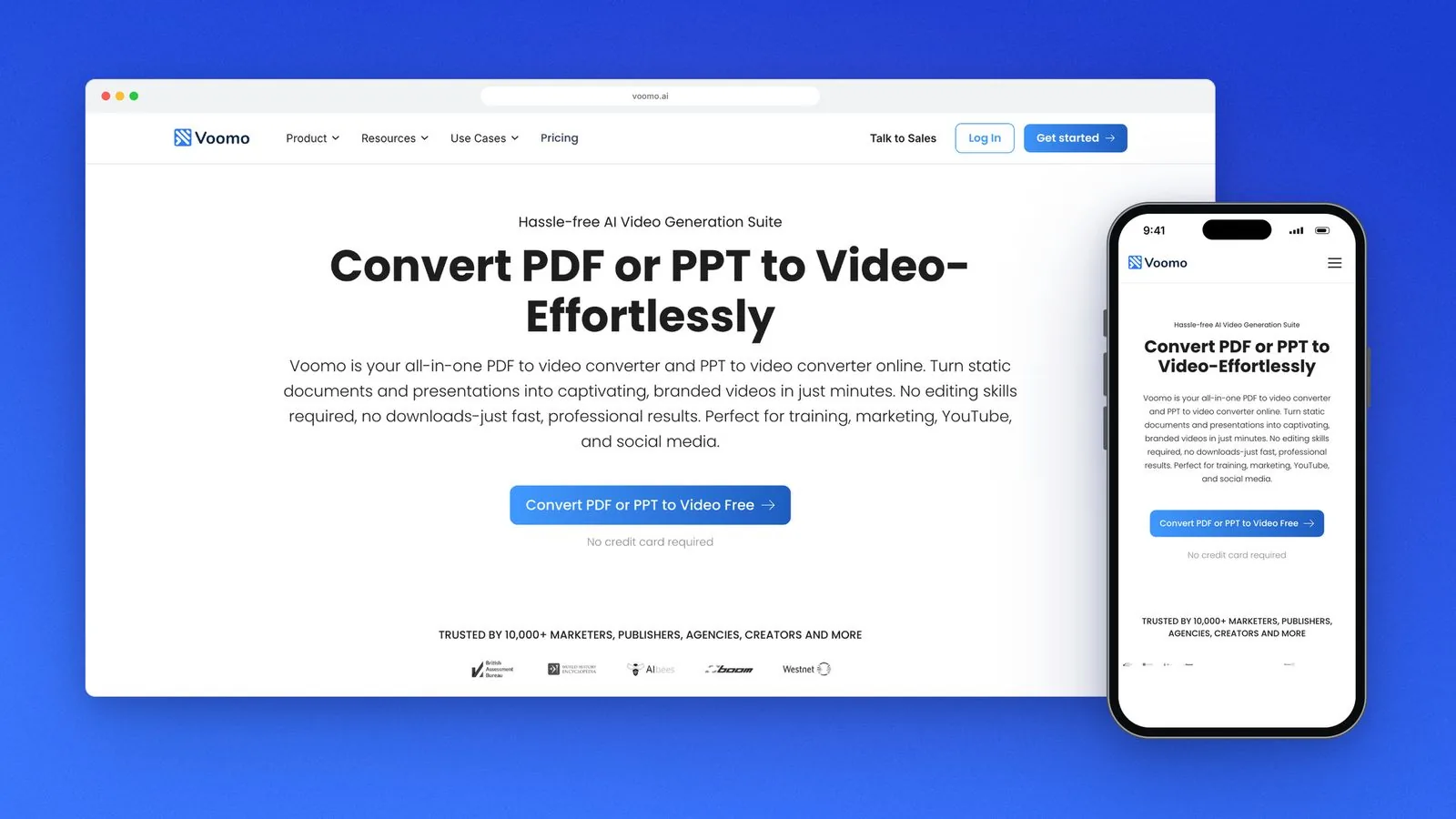
One of my own: Voomo, a Webflow build from the client's designs with 10,000+ CMS items and custom code, scores 92 on PageSpeed.
Voomo, built in Webflow from the client's designs, with 10,000+ CMS items and custom code.
Good answer: live URLs, mobile scores, and a plan for images and fonts on your site.
Worrying answer: a desktop score in a screenshot, with no live link.
11. Is this timeline realistic, and what would make it slip?
A realistic timeline comes as a range with named dependencies. Ask what the developer needs from you, and by when, for the dates to hold. The most common cause of a late launch is content that isn't ready, so ask what happens to the timeline if your copy arrives late.
For comparison, my estimator puts a 5-page build from a ready Figma file at 1 to 3 weeks, and a 10-page site with a blog at 2 to 4 weeks. With design included, a 5-page site takes 4 to 6 weeks and a 10-page site 5 to 9. I take on two projects at a time, which is part of why those ranges hold.
Good answer: a range, a list of what's needed from you, and how many other projects run alongside yours.
Worrying answer: a single fixed date offered before the developer has seen your designs or content.
12. Can I see live sites and talk to past clients?
Ask for live URLs, not only screenshots, and for a way to check what past clients said. Marketplace profiles help because the reviews are tied to paid contracts. Ask which parts of each site the developer built, since agency portfolios often show team work.
My Upwork profile is Top Rated, with 100% Job Success and a 5.0 rating from 4 reviews as of October 2026. Four reviews is a small sample, so judge the live sites too.
Good answer: live links, a clear note of who did what, and reviews you can verify.
Worrying answer: only mockups, or "my clients are under NDA" for every project.
A one-page scorecard for comparing developers
Use this table on each call. A developer who gives the worrying answer to question 1, 2 or 6 should drop off your list, however good the portfolio looks.
12 questions to ask a Webflow developer, with the answer to look for and the one that should worry you. As of October 2026.
Question
Good answer
Worrying answer
1. Who owns the site, Workspace and domain?
Transfer or client payments; domain in your name
Hosted on their account for a monthly fee
2. Which class system?
Client-First or another documented system, shown in a real project
"My own way"
3. How is the CMS planned and handed over?
Field list before the build; editor publishes a test item
"We'll work it out as we go"
4. What happens after launch?
Bug-fix window, then a priced monthly plan
"Just message me"
5. What hours overlap?
Named overlap and reply time
"Always available"
6. How are payments staged?
Deposit, then stages tied to visible milestones
100% up front
7. How many rounds of changes?
A number, a definition, a price for extras
"Unlimited" on a fixed price
8. SEO and redirects?
301 map of every old URL; Search Console checked
"Webflow handles SEO"
9. Accessibility?
WCAG 2.2; keyboard and contrast checks
A plugin added at the end
10. Speed?
Live sites you can test on mobile
Desktop screenshot only
11. Timeline?
A range with named dependencies
A fixed date before seeing your content
12. References?
Live links and verifiable reviews
Mockups only
When a solo developer is the wrong hire
Hiring one developer works when the scope fits one person's week. It's the wrong choice when you need design, copy, development and SEO delivered at once by different specialists on a fixed launch date, or when you need someone on call the same day for a site that takes payments. An agency with several people costs more and covers those cases better.
On a first call, I answer all 12 of these for your project and tell you plainly if I'm not the right fit.
Print the scorecard, ask every developer on your shortlist the same 12 questions, and compare the answers side by side. To see the stages a build goes through before you talk to anyone, read how a project runs, step by step.
I'm Chirag Singh. I design and build Webflow sites at diyo.studio in New Delhi, and I write about what comes up on client builds.
Choosing a Webflow User Accounts alternative in 2026: Memberstack vs Outseta prices, Zapier, Make or n8n for old Logic flows, and a migration checklist.
Webflow maintenance in 2026: what Webflow hosting covers, what still needs a person, a monthly checklist, care plan prices and what a plan should include.
Webflow site speed in 2026: Core Web Vitals thresholds, field vs lab data, and the Webflow fixes for images, fonts, scripts and animation, in priority order.
How to hire a Webflow developer in India from the US, UK, UAE or Australia: time-zone overlap, payments and GST, IP contracts, data protection and prices.
Webflow vs Wix vs Squarespace in 2026: three-year costs, design control, CMS limits, SEO, speed and lock-in, and which one fits your team and growth plans.
Webflow AEO in 2026: the robots.txt rules, page structure, schema and third-party mentions that get a Webflow site cited by ChatGPT, Perplexity and Google.
Is Webflow good for SEO? Yes, for most marketing sites. What Webflow handles natively, its real limits as of October 2026, and who should pick another platform.
Webflow developer rates and cost in 2026 for the US, UK, UAE, Australia and India, from Upwork, Clutch and Webflow's partner directory, plus quote tips.
Framer vs Webflow in late 2026: current pricing, CMS limits, editing, SEO, languages and migration, with a plain guide to who should pick each platform.
Webflow pricing as of October 2026: Site and Workspace plans, seats, yearly billing, bandwidth, add-ons, ecommerce and what changes at your next renewal.
A build-ready Figma file for Webflow: auto layout, variables, layer names, components, breakpoints and CMS states, checked against Webflow's plugin rules.