An honest Webflow vs WordPress comparison from a Webflow developer: 3-year cost, security, SEO, editing, and when WordPress is still the better pick.
Cover · a finished client build
10
min read
I build Webflow sites for a living, so read this with that bias in mind. My honest answer: Webflow fits most marketing sites for service firms and SaaS companies, because hosting, security updates and design control come in one bill. WordPress fits large stores, member communities, sites built around plugins Webflow can't replace, and teams that want a copy of the whole site they can move anywhere.
NoteChoose Webflow if your site is mainly marketing pages, a blog and case studies, your team wants to edit without touching plugins, and you'd rather pay one hosting bill than manage updates. Choose WordPress if you need memberships, courses, bookings or a store past 15,000 products, health data handled under HIPAA, or a site you can export with all its content and functionality intact.
Webflow vs WordPress at a glance
Webflow is a hosted platform: one company runs the builder, the CMS and the hosting. WordPress is open-source software you install on a host you choose, then extend with themes and plugins. That single difference explains most rows in the table below, which uses prices and facts checked on 13 Oct 2026.
Webflow vs self-hosted WordPress for a business site, as of 13 Oct 2026, in USD.
Question
Webflow
WordPress (self-hosted)
Hosting for a site with a blog
Premium plan, $25/mo billed yearly
Your choice of host; WP Engine Essential is $336/yr billed annually
Who updates the software
Webflow
You, your host or a maintenance service
Main security exposure
Account access and any third-party scripts you add
Plugins and themes (91% and 9% of 2025's new vulnerabilities)
Extending the site
Native features, code embeds, Webflow apps
75,000+ free plugins in the WordPress.org directory
Content editors
Content editor role; a seat per editor
Block editor; unlimited users
Ecommerce
From $29/mo yearly, up to 15,000 products
WooCommerce and others, no product cap from the software
Member logins
Third-party only (for example Memberstack)
Plugins
Leaving later
Code export without CMS or forms; CMS as CSV per collection
Full XML export; move to any host
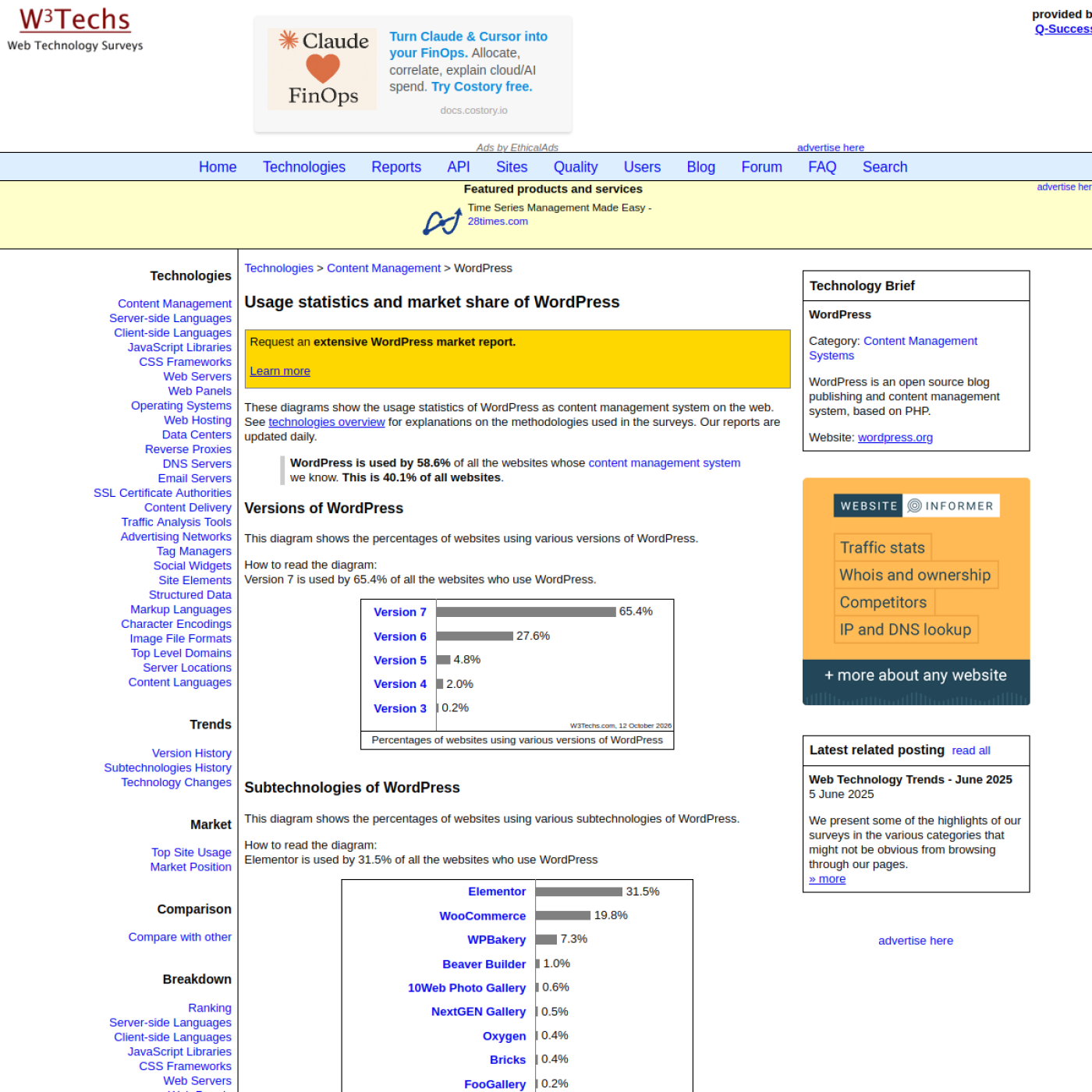
WordPress is far more common. W3Techs counts it on 40.1% of all websites and 58.6% of sites whose CMS it can identify, as of 12 Oct 2026. That reach is the reason it has a plugin for almost everything, and also the reason attackers target it.
WordPress usage statistics from W3Techs, data dated 12 Oct 2026. Captured from w3techs.com on 13 Oct 2026.
What does each cost over three years?
Over three years, a 10-page Webflow site with a blog costs about $933 to keep online: the Premium plan plus a domain. A comparable self-hosted WordPress site costs about $1,365 for hosting, two common plugin licenses and a domain, or about $4,570 if you pay a service to run updates and backups.
Three-year running cost of a 10-page site with a blog, build excluded, at prices listed on 13 Oct 2026, in USD.
The gap is smaller than many Webflow pages claim. If someone on your team is happy to run WordPress updates every week, the difference over three years is about $430. WordPress.com, the hosted version, also sells a Business plan with plugins at $25 a month billed yearly, the same as Webflow Premium. The real cost difference shows up in staff time and in the risk of a missed update, which the next section covers.
Build cost is a separate question and depends more on who builds than on the platform. My Webflow prices are in what a Webflow website costs: a 10-page site with a blog is $2,700 to $3,600 from your Figma file.
Is Webflow more secure than WordPress?
Webflow has a smaller attack surface for a typical business site, because Webflow patches the platform and there are no plugins to fall behind on. WordPress core itself had only 6 new vulnerabilities in 2025. The risk sits in plugins and themes, and in how fast a site's owner applies fixes.
Patchstack's State of WordPress Security in 2026 (updated 25 Feb 2026) counted 11,334 new WordPress vulnerabilities in 2025, up 42% on 2024. About 91% were in plugins and 9% in themes. Two of its figures matter most for a small business:
46% of vulnerabilities had no fix from the developer when they were made public.
For heavily exploited vulnerabilities, the weighted median time to mass exploitation was 5 hours.
Put together, a WordPress site with a dozen plugins needs someone watching it, and sometimes that person has to remove a plugin because no patch exists yet. A well-run WordPress site on a managed host is safe. The trouble is the many sites that are nobody's job after launch.
On Webflow, that job belongs to Webflow. Its security page lists SOC 2 Type II, ISO 27001, 27017, 27018 and 42001, and PCI-DSS. Every hosted site gets automatic SSL, DDoS protection and a global CDN, and Webflow keeps a version history of every change. Your part is narrower: two-factor login for everyone with access, and care with any third-party script you paste into the site.
WarningWebflow states that it "is not HIPAA compliant by default and is not designed to store or process protected health information". If your forms collect patient data in the US, use a HIPAA-compliant form tool or a different platform.
Which is better for SEO and AI search?
Neither platform ranks better on its own. Google ranks pages, not CMSs, and both platforms let you control titles, meta descriptions, URLs, redirects and sitemaps. The difference is effort: Webflow has these controls built in, while WordPress usually adds them through an SEO plugin you have to keep updated.
The same goes for AI search. Google's guide to AI features (updated 10 Jul 2026) says you don't need special files or markup to appear in its AI results, and that "there's no special schema.org markup you need to add". Anyone selling you a platform switch for AI visibility is selling something Google says doesn't exist.
Where the platform does matter is speed and clean markup, and that depends on the build more than the brand. Voomo, a site I built in Webflow with 10,000+ CMS items, scores 92 on PageSpeed. A WordPress site built carefully on a light theme can score just as well; one carrying a page builder and twenty plugins usually doesn't.
Which is easier for your team to edit day to day?
Webflow is easier for small marketing teams who edit pages and publish posts, because editors change text, images and CMS items without design permissions, so they can't break the layout. WordPress is easier when many people publish often, since the block editor is familiar and extra users cost nothing.
In Webflow, editors work in the content editor role, changing text, images and CMS items without design permissions. Webflow retired its old Editor on 4 Aug 2026 (Webflow Help Center). Editors now need a seat: a Limited seat is $15 a month billed yearly on your own Workspace, and freelancers and agencies can add clients on free client seats (launched 2 Feb 2026). Eight editors on your own Workspace come to $120 a month at that rate.
The quality of the build decides more than the platform. I build on Finsweet's Client-First, which names every class by what it does, so a new marketer can find the right section a year later. A WordPress site built from a sensible theme with reusable blocks gives editors the same safety.
WordPress wins on breadth: the WordPress.org directory lists over 75,000 free plugins, as of 13 Oct 2026. Webflow wins on what comes built in. A marketing site gets its CMS, forms, hosting, interactions and redirects without adding anything, and the gaps are filled by Webflow apps, third-party tools or custom code.
Three gaps matter most, as of October 2026:
Logins and members. Webflow retired User Accounts on 29 Jan 2026, so member areas need a tool such as Memberstack, from $25 a month billed yearly plus a 4% transaction fee on its Basic plan.
Automation. Webflow retired Logic on 27 Jun 2025 (Webflow update). Form workflows now run through tools like Zapier or Make.
Stores. Webflow's ecommerce plans run from $29 a month billed yearly with a 2% transaction fee (Standard, 500 products) to $212 a month for 15,000 products, per webflow.com/pricing. Bigger catalogs belong on WooCommerce or Shopify.
Custom code fills most other gaps. Webflow caps each code embed at 50,000 characters, so larger scripts are hosted elsewhere and loaded in. Most marketing sites never come close.
Can you leave Webflow later?
Yes, but you leave with less than WordPress gives you. Webflow's code export produces static HTML, CSS, JavaScript and images; the CMS, forms and site search don't work in the export. WordPress exports all your content in one XML file that any other WordPress host can import.
The details, from Webflow's export article (updated 31 Oct 2025): Collection lists show an empty state, forms stop working, only the primary language is exported, and code export needs a paid Workspace plan. You can export each CMS collection as a CSV, but image fields export as links to files hosted on Webflow, so download those files before you close the site.
WordPress's own export tool includes posts, pages, comments, custom fields, categories, tags and users in one WXR file. If owning a fully portable copy of your site matters to you, that's a real point for WordPress, and I'd rather you weigh it now than find out later.
When not to pick Webflow
I'd tell a client to stay on, or move to, WordPress in these cases, even though it means I don't build the site:
The site is a product, not a brochure: courses, bookings, a community or a membership with many paid tiers.
You sell more than 15,000 products, or your store needs WooCommerce extensions you already rely on.
Your forms handle protected health information under HIPAA.
You have a large editorial team, each person needing a seat, and a budget that can't carry it.
Your content will pass 20,000 CMS items. That's the Premium limit, and the next plan, Team, is $2,500 a month on an annual contract.
Your WordPress site works, it's patched, someone owns it, and the only complaint is that it looks dated. A redesign on WordPress costs less than a move.
If none of these apply and your site is mainly pages, a blog and case studies, Webflow is the one I'd choose, and the three-year numbers above show what it costs.
If you're switching: what a migration involves
There's no automatic converter from WordPress to Webflow. The design is rebuilt in Webflow, posts are imported into CMS collections, and every old URL gets a 301 redirect to its new address. Done in that order, with checks before and after launch, a move keeps the search traffic you've earned.
With me, a small WordPress site with one blog costs $3,400 to $5,100 and takes 3 to 6 weeks. A large site built in a page builder, with several collections and up to 500 redirects, costs $7,200 to $9,600 over 6 to 10 weeks. I check Search Console before and after launch, then watch the site for 30 days after the move.
Before you decide, count two things on your current site: the plugins it relies on and the number of distinct page layouts. If every plugin has a Webflow equivalent in the lists above, run those counts through the estimator to see what the move would cost.
I'm Chirag Singh. I design and build Webflow sites at diyo.studio in New Delhi, and I write about what comes up on client builds.
Choosing a Webflow User Accounts alternative in 2026: Memberstack vs Outseta prices, Zapier, Make or n8n for old Logic flows, and a migration checklist.
Webflow maintenance in 2026: what Webflow hosting covers, what still needs a person, a monthly checklist, care plan prices and what a plan should include.
Webflow site speed in 2026: Core Web Vitals thresholds, field vs lab data, and the Webflow fixes for images, fonts, scripts and animation, in priority order.
How to hire a Webflow developer in India from the US, UK, UAE or Australia: time-zone overlap, payments and GST, IP contracts, data protection and prices.
Webflow vs Wix vs Squarespace in 2026: three-year costs, design control, CMS limits, SEO, speed and lock-in, and which one fits your team and growth plans.
Webflow AEO in 2026: the robots.txt rules, page structure, schema and third-party mentions that get a Webflow site cited by ChatGPT, Perplexity and Google.
Is Webflow good for SEO? Yes, for most marketing sites. What Webflow handles natively, its real limits as of October 2026, and who should pick another platform.
Webflow developer rates and cost in 2026 for the US, UK, UAE, Australia and India, from Upwork, Clutch and Webflow's partner directory, plus quote tips.
Framer vs Webflow in late 2026: current pricing, CMS limits, editing, SEO, languages and migration, with a plain guide to who should pick each platform.
Webflow pricing as of October 2026: Site and Workspace plans, seats, yearly billing, bandwidth, add-ons, ecommerce and what changes at your next renewal.
A build-ready Figma file for Webflow: auto layout, variables, layer names, components, breakpoints and CMS states, checked against Webflow's plugin rules.